







{ GOOGLE SHOPPING ADS. BUILT AROUND YOUR PRODUCTS. }

Google Shopping Ads Management Built to Turn Product Searches Into Sales.

AdsLectic helps ecommerce brands manage Google Shopping Ads through product data, Google Merchant Center and performance-focused campaign management. We connect relevant products with shopping demand to help turn product discovery into measurable ecommerce opportunities.

Product Data & Feeds

Structure the product information that powers Shopping ads.

Reach across the web
Google Merchant Center

Connect and manage product inventory for Google advertising.

Visual Product Ads

Show product imagery and key information before the click.

Ecommerce Measurement

Connect product advertising with relevant conversion outcomes.

{ 02 } WHY GOOGLE SHOPPING ADS

Why Google Shopping Ads
Work for Ecommerce Brands.

Google Shopping Ads combine product imagery and key product information with relevant shopping demand, helping ecommerce brands put products in front of people while they are actively discovering and comparing what to buy.

01

Visual Product Discovery

Show Products Before the Click –

Show product imagery and key information before shoppers visit your store, helping them quickly understand the offer.

02

Relevant Shopping Demand

Reach Relevant Shopping Demand –

Use Merchant Center product data to connect eligible products with relevant searches and potential shoppers.

03

Product Information Upfront

Give Shoppers Product Context Upfront –

Show imagery, title and price upfront to help shoppers evaluate products before visiting your ecommerce store.

04

Ecommerce Journey

Connect Product Discovery With Ecommerce –

Create a direct path from product discovery to your ecommerce store, where shoppers can continue toward purchase.

{ 03 } GOOGLE SHOPPING ADS MANAGEMENT SERVICES

Google Shopping Ads Management Built Around Products, Data & Ecommerce Performance.

AdsLectic manages the core elements behind Google Shopping campaigns—from Merchant Center and product data to campaign structure, product advertising and ecommerce measurement—helping brands build a stronger foundation for Shopping Ads performance.

01

Google Merchant Center Management

Connect and organize product inventory within Google Merchant Center to create a reliable foundation for Shopping advertising.

Merchant Center · Product Inventory · Account Connection

02

Shopping Product Feed Management

Structure and maintain product data used by Google to understand your inventory and create relevant product advertising experiences.

Titles · Images · Price · Availability

03

Google Shopping Campaign Management

Build and manage Google Shopping campaigns around relevant products, business objectives and ecommerce advertising priorities.

Campaign Structure · Product Groups · Advertising Goals

04

Product Catalogue Structuring

Organize products and product groups so different parts of your ecommerce catalogue can be managed with greater clarity and control.

Products · Categories · Product Groups

05

Ecommerce Conversion Tracking

Connect Shopping campaign activity with relevant ecommerce conversion signals to better understand advertising outcomes after the click.

Conversions · Purchase Actions · Measurement

06

Dynamic Remarketing

Reconnect with relevant visitors using eligible product-based remarketing experiences that can bring previously viewed products back into consideration.

Product Remarketing · Returning Visitors · Ecommerce

{ 04 } PRODUCT FEED & GOOGLE MERCHANT CENTER

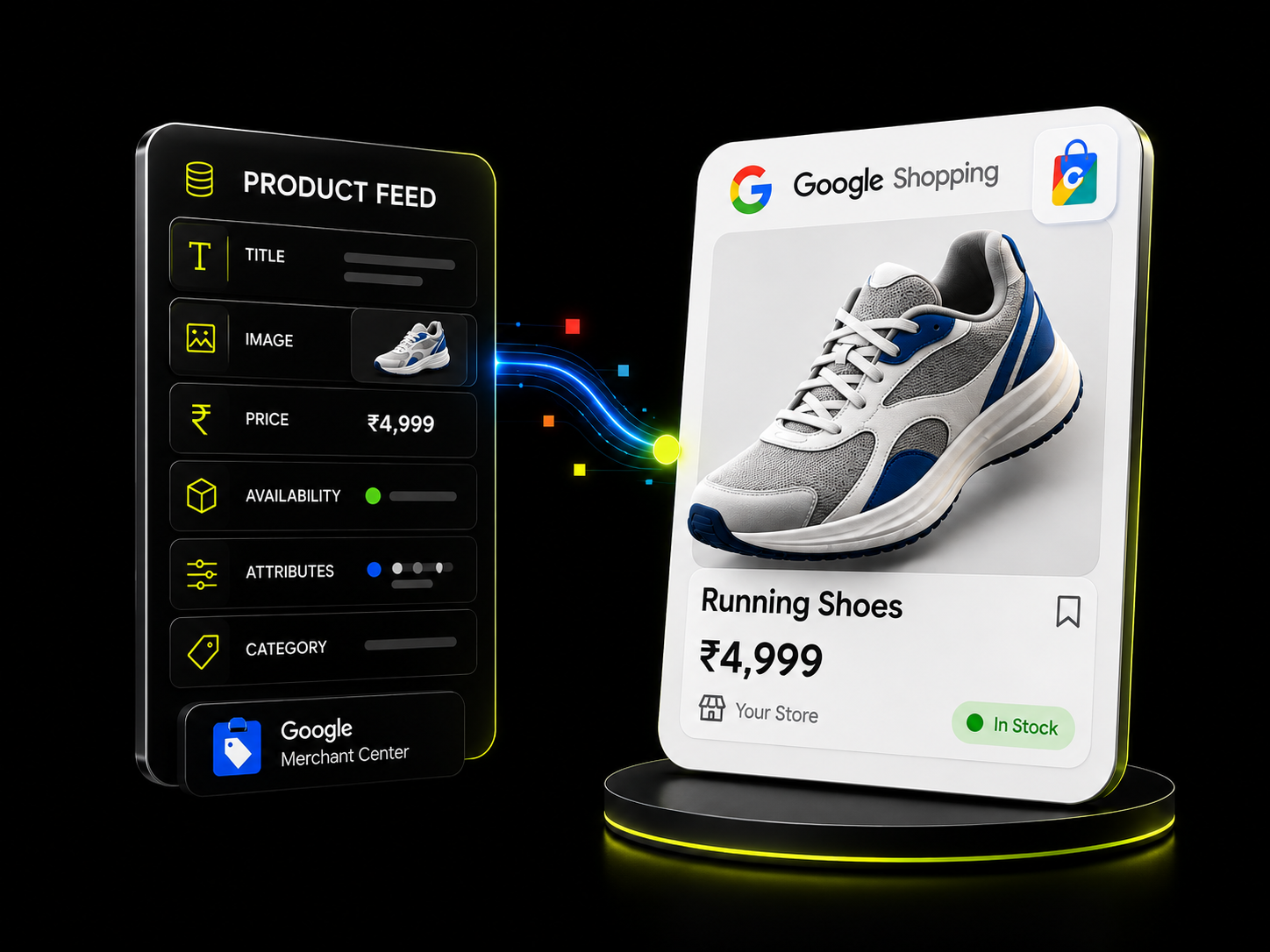
Google Shopping Product Feed Optimization Starts With Better Product Data.

Google Shopping Ads rely on Merchant Center product data to understand What you sell and match eligible products with relevant searches. Accurate, well-structured product information creates a stronger foundation for product visibility and Shopping campaign performance.

PRODUCT FEED ANATOMY
PRODUCT CONTENT

PRODUCT TITLE

Clear, relevant
product naming

PRODUCT IMAGE

Accurate visual
product representation

COMMERCE DATA

PRICE

Consistent product
pricing

AVAILABILITY

Current product
stock status

PRODUCT STRUCTURE

ATTRIBUTES

Relevant product
identifiers and details

CATEGORY

Structured product
classification
{ 05 } HOW GOOGLE SHOPPING ADS WORK

How Google Shopping Ads Work From Product Feed to
Shopping Campaign.

Google Shopping advertising connects your ecommerce product data with Merchant Center and Google Ads. Once eligible product information is available, Shopping campaigns can use that data to present relevant products across eligible Google shopping experiences.

Your Ecommerce Product Catalogue

Product information from your ecommerce store provides the foundation for the inventory you want to make available for Shopping advertising.

Products · Pricing · Availability

Product Data in Google Merchant Center

Relevant product information is submitted and maintained in Merchant Center, where eligible inventory can be prepared for use across Google advertising.

Product Feed · Inventory · Eligibility 

Connect Products With Google Ads

Merchant Center inventory can be connected with Google Ads so eligible products can be used within relevant Shopping campaign strategies.

Google Ads · Shopping Campaigns · Products

Products Appear in Shopping Experiences

Eligible products can be presented with visual product information across relevant Google shopping experiences, helping shoppers discover and evaluate what you sell.

Product Image · Title · Price

{ 06 } SHOPPING ADS PERFORMANCE & MEASUREMENT

Google Shopping Ads Performance Measured Beyond
the Click.

Google Shopping campaign performance can be evaluated across product visibility, shopper engagement, conversions and advertising efficiency. AdsLectic uses relevant campaign and ecommerce data to help brands understand how Shopping Ads contribute to measurable outcomes.

Shopping Ad Impressions

Measure how often eligible product ads are shown across relevant Google shopping experiences.

Click-Through Rate (CTR)

Understand how often Shopping Ad impressions result in shoppers clicking through to explore your products.

Cost Per Click (CPC)

Track the average advertising cost associated with clicks generated through Google Shopping campaigns.

Ecommerce Conversion Rate

Evaluate how effectively Shopping Ad traffic progresses toward purchases or other defined ecommerce conversion actions.

Cost Per Conversion

Understand the advertising cost associated with generating defined conversion actions from your Shopping campaigns.

Return on Ad Spend (ROAS)

Compare attributed conversion value with advertising spend to understand the return associated with Shopping campaign investment.

{ 08 } ECOMMERCE CATEGORIES WE SUPPORT

Google Shopping Ads for Ecommerce Product Categories.

Google Shopping Ads can support product discovery across a wide range of ecommerce categories. AdsLectic helps eligible retailers and ecommerce brands connect relevant product inventory with shopping demand across Google.

Fashion & Apparel
Clothing · Footwear · Accessories
Beauty & Personal Care
Skincare · Beauty · Grooming
Consumer Electronics
Audio · Devices · Accessories
Home & Living
Furniture · Décor · Homeware
Sports & Fitness
Equipment · Apparel · Accessories
Pet Supplies
Pet Care · Food · Accessories
Health & Wellness
Personal Care · Wellness Products
Everyday Essentials
Household · Personal · Consumer Products
Automotive Accessories
Parts · Care · Accessories
{ 09 } GOOGLE SHOPPING ADS FAQs

Frequently Asked Questions About Google Shopping Ads

Google Shopping Ads are product-focused advertisements that can display information such as a product image, title, price and merchant name. They help eligible retailers present products visually across relevant Google shopping experiences and connect shoppers with products available through their ecommerce stores.

Google Shopping Ads use product information submitted through Google Merchant Center to understand the products a retailer offers. Eligible product data can then be used with Google Ads campaigns to match products with relevant shopping opportunities and display product-focused advertisements.

Google Shopping Ads are product-focused and use Merchant Center product data to present information such as product imagery, title and price. Search Ads are primarily text-based advertisements that can use keywords to compete for relevant searches. Shopping Ads are therefore particularly suited to eligible ecommerce products, while Search Ads can support a wider range of products, services and business objectives.

Google Shopping Ads are designed for eligible retailers and ecommerce businesses with products that comply with Google’s Shopping policies and relevant Merchant Center requirements. Product eligibility can depend on factors including the products being sold, product data quality, website requirements and target market.

Shopping Ads primarily use Merchant Center product data rather than advertiser-selected keywords to determine relevant product advertising opportunities. Product titles, descriptions, categories and other submitted attributes can therefore play an important role in how Google understands the products being advertised.

Depending on campaign type, eligibility, country and Google’s available inventory, product advertising can appear across relevant Google surfaces and shopping experiences. Exact placements can vary, so advertisers should evaluate placement and campaign reporting within Google Ads.

They can be. Suitability depends on factors such as product eligibility, margins, competition, product demand, feed quality, advertising budget and the ecommerce experience. A smaller retailer can still use Shopping Ads when the channel makes commercial sense for its products and objectives.

Google Merchant Center is the platform businesses use to provide and manage product and business information for eligible Google shopping experiences. Product data maintained in Merchant Center can be connected with Google Ads for Shopping advertising.

A Google Shopping product feed is structured product information supplied to Merchant Center. It can contain attributes such as product titles, descriptions, images, prices, availability, identifiers and other information Google uses to understand the products in a catalogue.

Accurate and well-structured product data helps Google understand what a retailer sells and supports product eligibility and relevance across Shopping experiences. Product feed optimization focuses on keeping important attributes clear, accurate, complete and consistent with the ecommerce store.

Requirements vary by product, market and Merchant Center program, but product data can include attributes such as an ID, title, description, image, price, availability, brand and relevant product identifiers. Additional attributes may be required depending on the product category and target country.

Products can be disapproved when product data or the associated website does not meet applicable Merchant Center requirements or Shopping policies. Issues can include inaccurate or mismatched information, missing required attributes, policy violations or problems with the product landing page.

Yes. Product information submitted to Merchant Center should remain consistent with the corresponding landing-page information. Price mismatches can create a poor shopping experience and may also lead to product-data or eligibility issues.

Yes. Submitted availability should accurately reflect whether a product is available on the corresponding ecommerce landing page. Keeping stock information current helps maintain consistency between the Shopping experience and the retailer’s website.

Potentially, but products must meet applicable eligibility, data and policy requirements. Businesses may also choose how products are included or prioritized according to their catalogue, campaign structure and advertising objectives rather than treating every product identically.

For conventional product-based Shopping advertising, Merchant Center plays a central role in supplying and managing product information used by Google. The exact setup can vary as Google’s ecommerce advertising products evolve, but product data remains fundamental to Shopping advertising.

There is no fixed universal cost for Google Shopping Ads. Advertising costs vary based on factors such as competition, product category, campaign settings, market conditions, bids and advertising objectives. The appropriate budget should be considered alongside product margins and ecommerce economics.

There is no single budget suitable for every ecommerce business. Budget requirements depend on product range, competition, average product value, margins, demand, target market and campaign objectives. A useful budget should provide enough activity to evaluate performance while remaining commercially appropriate for the business.

The charging model depends on the campaign and advertising setup being used. Cost-per-click bidding is commonly associated with Shopping advertising, where advertisers can incur cost when users interact with eligible ads, while other Google campaign configurations may use different bidding and optimization approaches.

Return on Ad Spend (ROAS) compares attributed conversion value with

advertising spend.


ROAS = Attributed Conversion Value ÷ Advertising Spend


For example, ₹100,000 in attributed conversion value against ₹20,000 in

advertising spend represents a 5× ROAS.

There is no universal good ROAS for every ecommerce business. An appropriate target depends on product margins, operating costs, average order value, customer economics, growth objectives and other commercial factors. ROAS should therefore be evaluated in the context of the individual business rather than against one generic benchmark.

Relevant metrics can include impressions, click-through rate (CTR), cost per click (CPC), conversion rate, cost per conversion and return on ad spend (ROAS). The appropriate combination of metrics depends on the campaign objectives and ecommerce outcomes being measured.

There is no fixed timeframe that applies to every campaign. Meaningful evaluation generally requires sufficient traffic and conversion data, while timing can vary according to product demand, competition, budget, catalogue size, seasonality and campaign objectives.

Clicks without purchases can result from several factors, including product-market fit, pricing, competition, landing-page experience, availability, shipping considerations or a mismatch between shopper expectations and the final offer. Campaign traffic should therefore be evaluated alongside the ecommerce experience and conversion data.

No. Google Shopping Ads can help eligible products gain paid visibility and connect with relevant shopping opportunities, but advertising cannot guarantee sales. Results also depend on product demand, pricing, competition, product data, website experience, availability and the overall customer offer.